As an Amazon Associate, I earn from qualifying purchases. This comes at no extra cost to you and helps keep this site running.
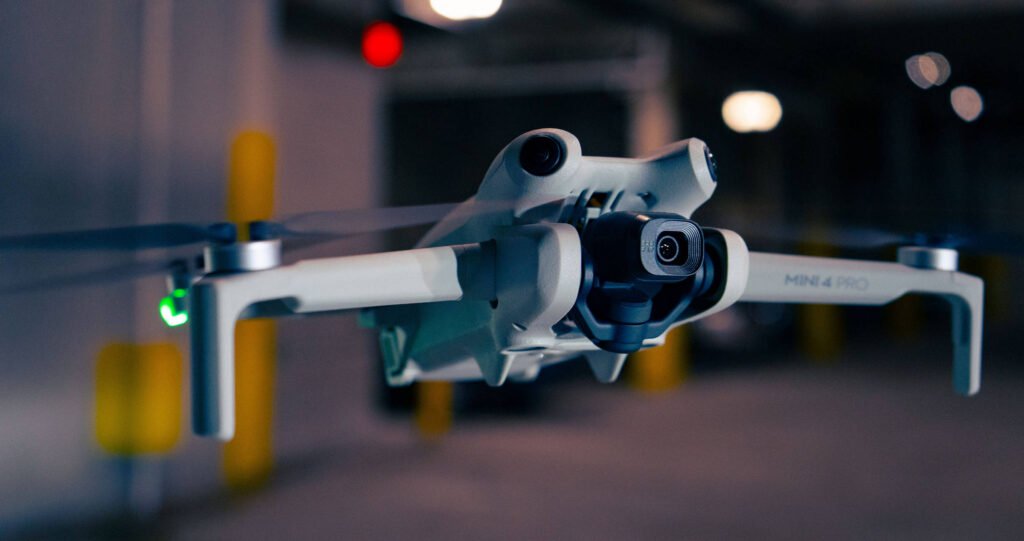
When the DJI Mini 4 Pro came out in late 2023, it was the most capable sub-250g drone DJI had ever made. Omnidirectional obstacle sensing, 4K/60fps, 10-bit color, ActiveTrack 360 — all in a package that weighs less than a sandwich. At the time, the $759 base price felt like a lot to ask for something this small.
Now it’s 2026. The Mini 5 Pro launched in September 2025 and pushed the Mini 4 Pro off the top of the lineup. Which means the Mini 4 Pro is now the “previous generation” drone — and you can often find it noticeably cheaper than it used to be. I’ve been flying the Mini 4 Pro on and off for well over a year, and I think it’s genuinely one of the best deals in drones right now. Here’s everything you need to know.
Specs at a Glance
| Spec | DJI Mini 4 Pro |
|---|---|
| Weight | 249g (no FAA registration required for recreational use) |
| Camera sensor | 1/1.3-inch CMOS, 48MP |
| Video | 4K/60fps, 4K/30fps HDR, 2.7K/60fps, 1080p/200fps slow-mo |
| Photos | 48MP RAW + JPEG |
| Color modes | 10-bit D-Log M, HLG, Normal |
| Gimbal | 3-axis mechanical (-90° to +60° tilt, ±30° roll) |
| Obstacle sensing | Omnidirectional (APAS 5.0) — 4 wide-angle + 2 downward sensors |
| Video transmission | O4, up to 20km (FCC) / 10km (CE) |
| Flight time | 34 min (standard battery) / 45 min (Plus battery) |
| Wind resistance | Level 6 — up to 10.7 m/s (24 mph) |
| Smart features | ActiveTrack 360, QuickShots, Hyperlapse, MasterShots |
| Price (base) | Check Amazon — usually $599–699 now that Mini 5 Pro is out |
Who is this drone for? The Mini 4 Pro is aimed at photographers and video creators who want a serious portable camera drone but don’t want to deal with FAA registration. The 249g weight is the key — it keeps you under the registration threshold for recreational pilots. It’s also a strong pick for travel, hiking, and anyone who wants a drone that fits in a jacket pocket but shoots like something much bigger.
📷 Camera & Image Quality
The 1/1.3-inch CMOS sensor is the biggest reason to take this drone seriously. It’s noticeably larger than the sensors in budget GPS drones, and you can feel that difference when you start editing — especially in tricky lighting. Shooting at golden hour, you get real shadow detail and highlight control that a 1/2-inch sensor just can’t match.
The 4K/60fps mode is smooth and sharp for aerial footage. If you’re capturing fast-moving subjects — a car, a boat, a person running — having 60 frames a second gives you much more to work with in editing. The 1080p/200fps slow-motion mode is a fun option, though the resolution does drop noticeably at 200fps. For proper slow-motion shots, 4K/60fps slowed to 24fps in post gives better-looking results for most uses.
D-Log M is the color mode that serious videographers are going to care about. It captures a flatter, more neutral image that holds more shadow and highlight information — you grade it in post to get the final look. If you’re not doing color grading, shoot in HLG instead, which gives you better dynamic range than Normal mode without needing to color grade. D-Log M is genuinely useful here; DJI’s implementation is clean and the 12.8 stops of dynamic range is real.
For still photography, 48MP RAW files give you plenty of room to crop and edit. In practice, I shoot at 4K video and occasionally stop for stills at 48MP when I want the detail for a wide landscape shot. The results are excellent for a drone at this size and price. Low-light is the one area where the 1/1.3-inch sensor shows its limits compared to a 1-inch sensor — you’re going to see noise at ISO 1600 and above, so plan your flights for good light when you can.
The 3-axis mechanical gimbal is what keeps your footage looking smooth. The key word is mechanical — this isn’t digital stabilization, which can look blurry or cause warping artifacts. The gimbal physically moves to compensate for the drone’s movement, and the results are noticeably better than EIS-stabilized budget drones in any kind of wind or when you’re moving the camera intentionally. It tilts from -90° (straight down) to +60° (slightly upward), which gives you a wide range of creative shots.
🚁 Flight Performance
For a 249g drone, the Mini 4 Pro holds its own in wind better than you’d expect. Level 6 wind resistance means it’s rated to handle winds up to about 24 mph — that’s a meaningful breeze that would make you nervous with a lighter, less capable drone. In practice, I’ve flown it in conditions I’d describe as genuinely gusty (gusts pushing 15–18 mph) and it stayed smooth and responsive the whole time. DJI’s GPS hold is solid; when you let go of the sticks, it just sits there.
The three flight modes each have a real purpose. Cine mode slows everything down — movements are smooth and deliberate, which is what you want when you’re getting slow, cinematic shots. Normal mode is where most flying happens; responsive but not twitchy, good for general shooting. Sport mode unlocks higher speeds and disables obstacle sensing, which makes sense — obstacle avoidance can’t keep up at 57 kph, so DJI rightfully turns it off. Sport mode is fun for covering ground quickly, but it’s not how you shoot footage.
GPS precision is excellent. Hovering in place, the drone barely moves. Return to Home works reliably — I’ve tested it intentionally multiple times, and it comes back and lands within a meter of where it took off. The one thing to know about RTH: it climbs to a set altitude before flying home, so make sure your RTH altitude is set high enough to clear any obstacles between you and the drone before you fly. Set it and leave it.
🛡️ Obstacle Sensing — The Real Differentiator
This is the feature that separates the Mini 4 Pro from every other sub-250g drone at its price. Omnidirectional obstacle sensing means the drone has sensors covering the front, back, left, right, and below — not just forward-facing like budget drones. APAS 5.0 (Advanced Pilot Assistance System) uses that sensor data to actively steer around obstacles rather than just stopping in front of them.
In practice, this is genuinely impressive. Flying through a wooded area with branches overhead, the drone detects and routes around things you’d never catch on the video feed in time. Tracking a subject with ActiveTrack while flying backwards? The sensors watch behind the drone so it doesn’t back into a tree. This kind of coverage used to cost $1,500+. Getting it under $700 is a real jump in what’s accessible.
That said, it has limits worth knowing. Thin wires — power lines, fences — are notoriously hard for vision-based obstacle sensors to detect, and this drone is no exception. Don’t fly near power lines and expect the sensors to save you. The sensors also turn off in Sport mode, which makes sense at those speeds. In good light, the sensing works well. In low light (dusk, night flying), the vision sensors are less reliable. Fly with awareness, not blind trust.
The key point: omnidirectional sensing gives you a safety margin that makes a real difference when you’re new to drone flying, or when you’re flying in areas with obstacles. It doesn’t replace good pilot judgment, but it does reduce the “I didn’t see that” crashes that trip up beginners and distracted pilots.
🎯 ActiveTrack 360 & Smart Modes
ActiveTrack 360 is DJI’s subject-following system, and on the Mini 4 Pro it works better than I expected. You tap a subject on the screen, the drone locks on, and it follows while keeping the camera pointed at them. The 360 part matters: the drone uses its omnidirectional sensors to fly around and behind the subject, not just forward and back. Combined with the automatic framing adjustments, you can get shots that look like they required a professional camera operator.
In real-world use, it handles people well — especially someone walking, jogging, or cycling on a relatively open path. It struggles more with fast, unpredictable movement (someone zigzagging through a crowd) or situations where the subject blends into a busy background. For travel and lifestyle content, it’s one of the most useful features on the drone.
QuickShots are the six automated flight paths DJI pre-programs in: Dronie (flies up and back while keeping you in frame), Circle (orbits you), Helix (spirals upward), Rocket (flies straight up), Boomerang (flies an oval around you), and Asteroid (flies up, takes a sphere shot, and plays it in reverse). These are genuinely fun and produce polished-looking results with no skill required. They’re the answer to “how do YouTubers get those fancy opening shots” — it’s mostly QuickShots.
Hyperlapse lets you shoot long time-lapse sequences while the drone moves — Free, Circle, Course Lock, and Waypoint modes. The results are cinematic and take patience to set up, but when they work, they look expensive. MasterShots is an automated mode where you tap a subject and the drone flies a sequence of preset shots, then stitches them into an edited clip. It’s impressive as a demo; in practice, I find it most useful for quickly capturing b-roll at a new location.
🔋 Battery Life — What to Actually Expect
The 34-minute rated flight time is measured in a wind tunnel under controlled conditions — hovering at a set speed with no wind. In real flying, with actual wind, movement, and the battery voltage warning that tells you to land, you’re looking at closer to 25–28 minutes per battery. That’s still excellent for the class. Budget GPS drones often land at 15–20 minutes real-world. The Mini 4 Pro’s numbers are honest enough.
The Intelligent Flight Battery Plus boosts rated time to 45 minutes, which translates to around 35–38 minutes of realistic flying. The trade-off is weight and size — the Plus battery is bigger, and it changes how the drone balances slightly. I’ve used both, and for any flight session longer than one battery, the Plus is worth it. Pick up two Plus batteries and you’re set for a full afternoon of shooting.
The Fly More Combo bundles two standard batteries, a charging hub, a shoulder bag, and ND filters (ND16, ND64, ND256) for around $100–150 more than the drone alone, depending on which controller version you choose. The ND filters are genuinely useful — they let you control your shutter speed in bright sunlight to get the cinematic “180-degree shutter rule” motion blur that makes video look more film-like. If you’re buying for video, the Fly More Combo is worth it for the filters alone.
📡 O4 Video Transmission — What 20km Really Means
The O4 transmission system gives the Mini 4 Pro a 20km video link in ideal, open conditions. In practice, you’re never going to fly 20km away — legal visual line of sight limits in the US put you at around 400–800 meters under normal recreational rules, and maintaining that requires you to be able to see the drone. What the 20km range actually means is that at the distances you’ll realistically fly, signal is rock solid. Interference from trees, buildings, and other 2.4GHz/5.8GHz sources makes much less of a dent when you have this much headroom to work with.
The video feed on the controller is smooth and low-latency enough that flying by the screen feels natural. At ~130ms latency you’re not going to notice any lag in normal flying. The O4 system is a real upgrade over the older OcuSync 2 and 3 systems, and it shows in areas with RF interference where older DJI drones would occasionally stutter or drop out.
📱 App, Controllers & the DJI Ecosystem
The Mini 4 Pro works with the DJI Fly app, which is the most polished drone app in the category. Setup is fast, the interface is clean, and the tutorials built into the app actually teach you the features rather than just listing them. If you’re switching from a competitor’s drone, the DJI Fly experience feels meaningfully more refined.
There are two controller options, and this is worth knowing before you buy. The RC-N2 (the cheaper option) is a physical controller that connects to your smartphone — your phone is the screen. It works well, but your phone needs to be charged, you need the right cable, and on a hot day your phone may overheat and reduce performance. The RC 2 is a smart controller with a built-in 5.5-inch screen, no phone required. It’s brighter, more convenient, and much better on a sunny day. The RC 2 adds around $100 to the price. If you’re buying new, I’d lean toward the RC 2 unless budget is a hard constraint.
DJI Care Refresh is DJI’s optional accident protection program. For around $79–99/year, it covers water damage, crash damage, and flyaway — up to two replacements per year. For a drone you’re flying in real conditions, it’s good peace of mind, especially in the first year when you’re still learning the aircraft’s handling. Not required, but worth the consideration.
How It Scores
The Good and the Trade-Offs
What Works Well
- Omnidirectional obstacle sensing at this price is genuinely impressive
- 4K/60fps with mechanical gimbal — footage looks smooth and sharp
- 10-bit D-Log M gives real dynamic range for color grading
- O4 transmission is rock solid at realistic flying distances
- 249g means no FAA registration for recreational flying
- ActiveTrack 360 is one of the best follow-cam systems available
- Compact and light enough for daily carry in a bag
- Discounted now — excellent value since Mini 5 Pro launched
Worth Knowing
- RC-N2 base controller requires a phone as the screen — RC 2 is better
- Real flight time is 25–28 min, not the stated 34
- Thin wires and low-light obstacles can fool the vision sensors
- 1/1.3-inch sensor shows noise above ISO 1600 — plan for good light
- Obstacle sensing turns off completely in Sport mode
- Mini 5 Pro has a larger 1-inch sensor if ultimate image quality matters
- No upward obstacle sensing (gap in the omnidirectional system)
Who Should Get the Mini 4 Pro
The Mini 4 Pro is the right choice if you want a serious camera drone that you can carry everywhere, you care about video quality and want to do some color grading, you fly in areas where obstacle sensing makes a real difference, or you’re budget-conscious and the discounted price compared to the Mini 5 Pro is attractive. It’s also a strong pick if you travel frequently — fitting a capable drone in carry-on luggage without checking a bag is genuinely useful.
It’s also a great pick for real estate photography at the lower end of the budget, aerial content for YouTube or social media, and anyone who wants a drone they can use in tight spaces with actual safety margins. The community around this drone is big, which means firmware has been tuned well and there’s no shortage of support and tutorials.
Who Might Want to Look Elsewhere
If the biggest priority is the best possible image quality in a sub-250g package, the DJI Mini 5 Pro (which starts at the same $759 the Mini 4 Pro launched at) has a larger 1-inch sensor and is worth the extra spend. If you need dual cameras — a wide and a telephoto — or you’re shooting professional real estate and video work where image quality is the primary concern, step up to the DJI Air 3S. And if you’re buying this purely to learn to fly with no interest in camera features, a much cheaper GPS drone does the job for a fraction of the cost.
Final Verdict — 4.8/5
The DJI Mini 4 Pro was already a great drone when it launched. Now that it’s previous-gen and selling for less, it’s close to a no-brainer for anyone who wants a capable, portable camera drone without going over $700. The camera is excellent, the obstacle sensing is the best available at this size and price, and the flight experience is smooth and confidence-inspiring.
If you already own a Mini 3 or Mini 3 Pro, the upgrade is meaningful but not urgent — think about whether the omnidirectional sensing and the O4 link are worth it to you specifically. If you’re coming from an older drone or buying your first serious one, the Mini 4 Pro is a genuinely excellent choice.
Check Price on Amazon → See Fly More Combo →Frequently Asked Questions
Is the DJI Mini 4 Pro worth buying now that the Mini 5 Pro is out?
Yes, for most people. The Mini 5 Pro has a larger 1-inch sensor and slightly better low-light performance, but it costs more. If you can find the Mini 4 Pro at a meaningful discount — which is common in 2026 — the image quality gap isn’t large enough to justify the price difference for casual to intermediate use. If you’re shooting professionally or you specifically need better low-light performance, the Mini 5 Pro is worth the premium.
Do I need to register the Mini 4 Pro with the FAA?
If you’re flying recreationally in the US, no. The Mini 4 Pro weighs 249g, which puts it under the 250g FAA registration threshold. If you fly commercially (including for real estate photography you get paid for), you need a Part 107 remote pilot certificate regardless of drone weight. Always check current FAA rules at faadronezone.faa.gov since regulations can change.
What’s the difference between the RC-N2 and RC 2 controller?
The RC-N2 is a basic physical controller — you clip your smartphone to it and use your phone as the display. It’s cheaper but requires your phone, and on bright sunny days your phone screen is hard to see. The RC 2 is a smart controller with a built-in 5.5-inch bright screen — no phone needed. The RC 2 adds roughly $100 to the purchase price and is the better option for regular flying. If you already have a good phone and plan to fly occasionally, the RC-N2 works fine.
How far can you actually fly the Mini 4 Pro?
The O4 system has a 20km range in perfect, open-field conditions. In practice, US recreational rules require visual line of sight — you need to be able to see the drone at all times, which limits practical range to a few hundred meters at most. Within legal limits, signal is essentially never an issue. The 20km rating means rock-solid connection at realistic legal distances, not a suggestion to fly 20km away.
Is the obstacle sensing good enough to trust?
It’s good enough to significantly reduce crashes, not good enough to fly carelessly. In normal flying conditions — good light, typical outdoor environments — APAS 5.0 does an impressive job of stopping and routing around obstacles. Thin wires, low-contrast obstacles, and low-light conditions are the weak spots. Think of it as a co-pilot who’s very good at their job but still benefits from you paying attention. Flying with obstacle sensing on gives you real protection; flying with it on and ignoring your surroundings is how you still crash.
How does the battery life hold up in practice?
Expect around 25–28 minutes of actual flying time per standard battery in normal conditions. DJI’s 34-minute rating is from a wind tunnel hover test, not real-world use. The Intelligent Flight Battery Plus extends rated time to 45 minutes, which works out to roughly 35–38 minutes in practice. For a full shooting session, I’d recommend two batteries minimum. The Fly More Combo is the easiest way to pick up extra batteries along with useful accessories.
Related Posts
Last updated: June 2026. Prices verified June 2026. Always check current pricing before purchasing.